
There are there are 3 ways to request support:
- Support Tab (Best Way)
- Email support@eResidentCare.com
- Call 888-282-2475
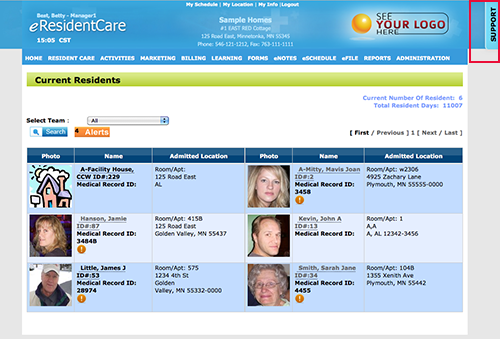
The best way to request support (any time of the day), is to use the support tab where you will need to fill out the form and include a screenshot. The support tab is located at the top right corner of your browser window. This is a great way for you to ask a question(s), make a comment(s), request a feature enhancement or to report any issues you may be having.
Follow these steps to create your support request:
- Click on the 'Support Tab' which is located on the top right corner of your browser window.
-
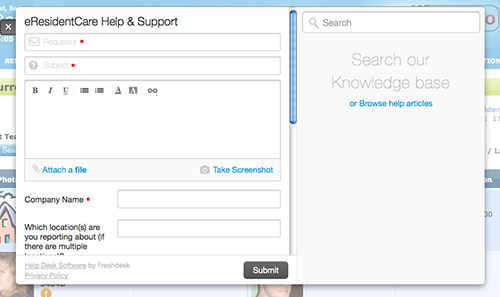
Fill out the form. Mandatory fields are marked with '*'.
-
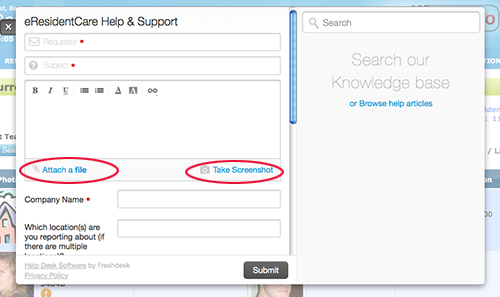
You can include a screenshot of the page you on by clicking 'Take Screenshot' or you can include a file by clicking on the 'Attach a File'.
-
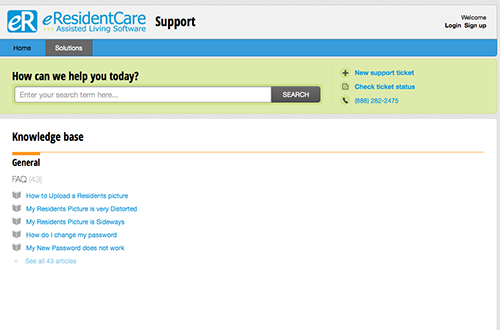
You can also Browse our Knowledgebase for more information on how to do something.
If this is your first time using our support system you will need to activate your account.
For more information on how to activate your account see How do I activate my account?