
MEDICATION ORDER ADDING SCHEDULES….Scenario: Received a medication order that is to be given twice a day later in the day so we don’t want to see the record showing missed on the MAR. How should we proceed:
Solution: There are two recommended options:
- Option one: Enter the order as normal, BID with start date current and on the eMAR mark the med pass as NA (not administered) and add a note explaining the NA status. The MAR will show NA in that time.
- Option two: Create two ‘Schedules’.
- Create the order for BID, for the date enter tomorrows date instead of the current date. (Example: Current date is 10/12, enter the start date: 10/13. Save
- Open up the new order (click ‘VIEW’), click the ‘Schedule’ tab and add a new schedule (see the sample below) for the first day. In the example below it shows a schedule for QD (once a day) with the time 20:00 and the start date and end date the same as the current date.
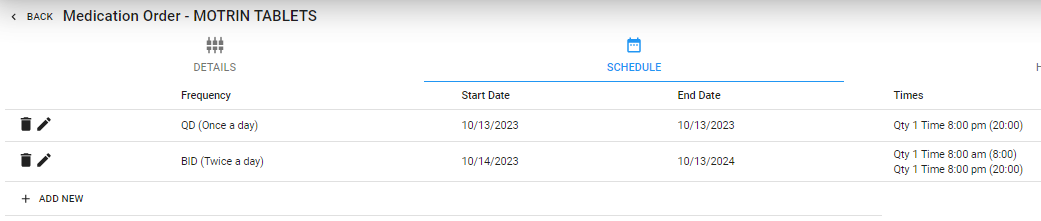
The MAR will show three lines, one for the one passing and the other two for the BID

