All eNotes can be printed by the eNotes from the main menu or in the 'Report Center':
Print from eNotes:
-
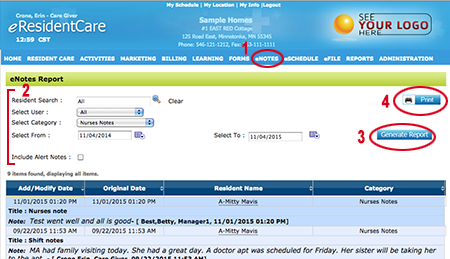
Goto the main menu and select "eNOTES."
NOTE: This menu also allows a quick view of all eNotes for all residents. - There are numerous view filters; by resident, by user, by category, by date range. Select your view options.
- Click "Generate Report" button.
-
Click to print your report by clicking on the "Print" button.
From The Report Center:
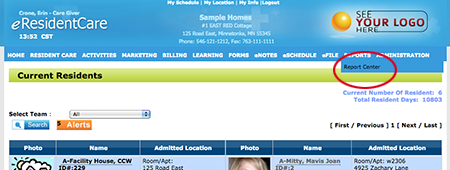
- Select the 'Report Center' from the mail menu.
-
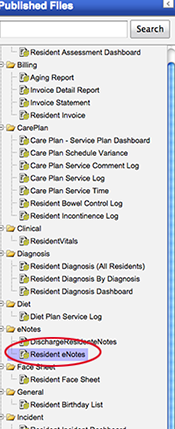
Select the 'Resident eNotes'
-
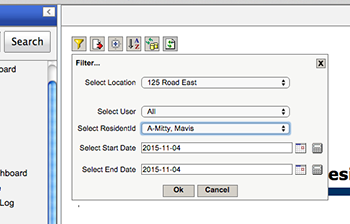
Click on the 'Filter Icon' and choose the Location, User, Resident and the date range then click 'Ok'.
-
Your 'Resident eNote Report' will be displayed.
-
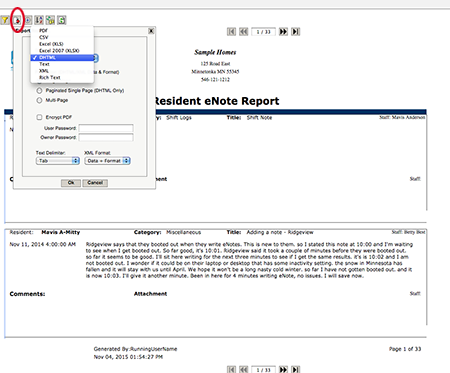
To print you will select the Export icon (as shown in the image below).
By default DHTML is selected. This option will open 'Care Plan Service Log' in a print ready view in a separate window
where you can print to your printer.