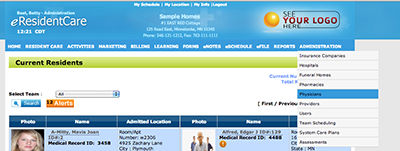
To add a new Physicians you need to either have the correct permission level, such as Administrator, or you need to contact the appropriate person. If you search the Resident Physician list and the correct Physician can not be found please go to the main navigation bar and select 'Physicians' under Administration.
Here you add the Physicians for your facility. You only need to add the new physician once and it will come up in future in all locations searches.
You can now return to Resident Physician search be able to find the Physician and add it to your residents list.
To add a Physcician to your Resident List follow theses steps:
- Add the information of the physician you want to search for. In the example below (see #1) we only added the first letter of both first and last name.
- Select the physician you want to add. As shown in the example below (see #2).
-
Click Add. As shown in the example below (see #3).
NOTE: The 'ADD' button will appear after you check the physician you want.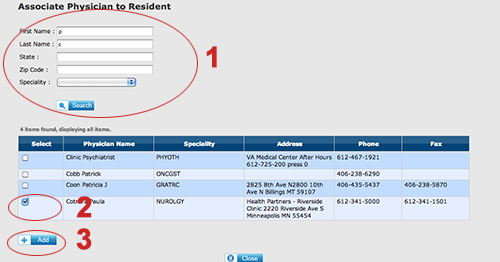
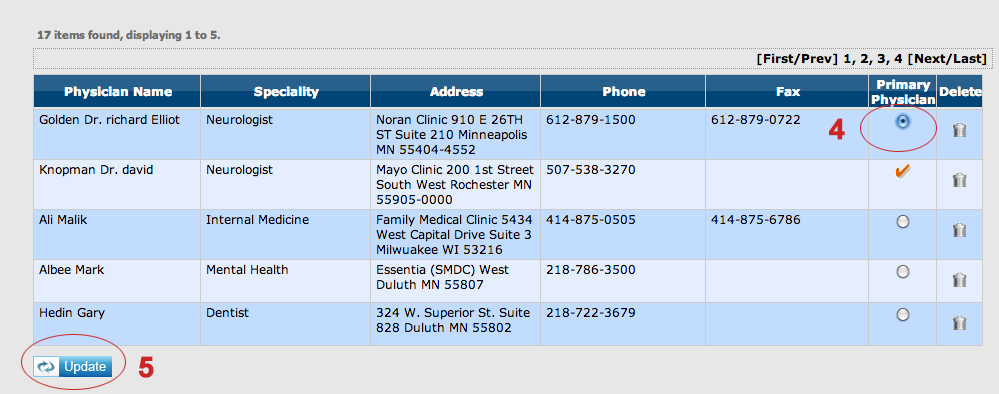
- If this new physician is the residents primary physician you will need to click on the radio button. As shown in the example below (see #4).
- Then click Update. As shown in the example below (see #5).